
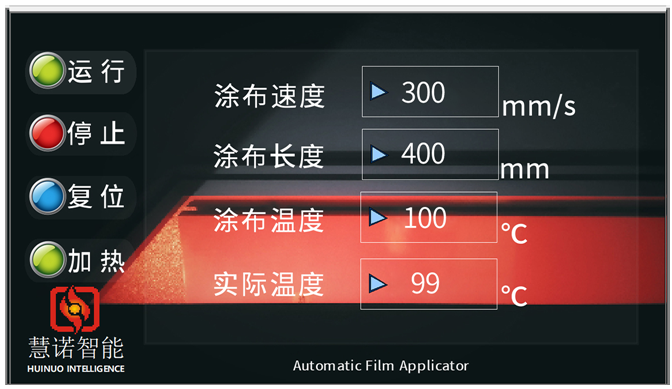
HuiNuo Intelligent Film Coater adopts color LCD Touchscreen control panel, which can realize operation, stop, reset, heating, Spreader speed setting, application length setting, Spreader temperature setting, and actual temperature display. As shown below (take the heating model as an example)
How to operate:
1) Spreader speed setting: The Spreader speed of the Film Applicator can be stepless between 1 and 300mm/s, and the speed value can be entered by clicking the blank box of the film speed.
2) application length setting: Film Applicator application length can be set between 0~ 400mm, click the application length blank box to enter the value and determine.
3) heating temperature setting: Film Applicator Temperature range RT +~ 180 ℃, click the blank box of temperature setting to enter the number and determine. The actual temperature value can be displayed during operation.
4) Run: After setting the Spreader parameters, click the "Run" button (the button will become "Pause" during the run), and the Film Applicator will scratch according to the parameters.
5) Pause: During the operation, if you need to pause, you can click "Pause", and the Film Applicator will pause the scraping.
6) Stop: If the Spreader process needs to be stopped, clicking the "Stop" button will stop this scraping.
7) Reset: After the Spreader is over, click the "Reset" button, and the Spreader head can return to its original position.
8) Heating: After setting the heating parameters, click the "heating" button, the Film Applicator starts heating, and the right side of the display shows "heating". If you need to stop heating, you can click the "heating" button, and the Film Applicator will suspend heating.


 简体中文
简体中文 Korean